
Rovo and Strategy Hub: why bet on Atlassian's Teamwork Graph
Hi all! There are many opportunities online, but I released Strategy Hub on the Atlassian Marketplace because I believe in one idea that Atlassian is betting its future on: the Teamwork Graph. Here are my thoughts about why I think context is what makes AI useful, and what our Rovo agent does today.
The bet: one graph for everything your team knows#
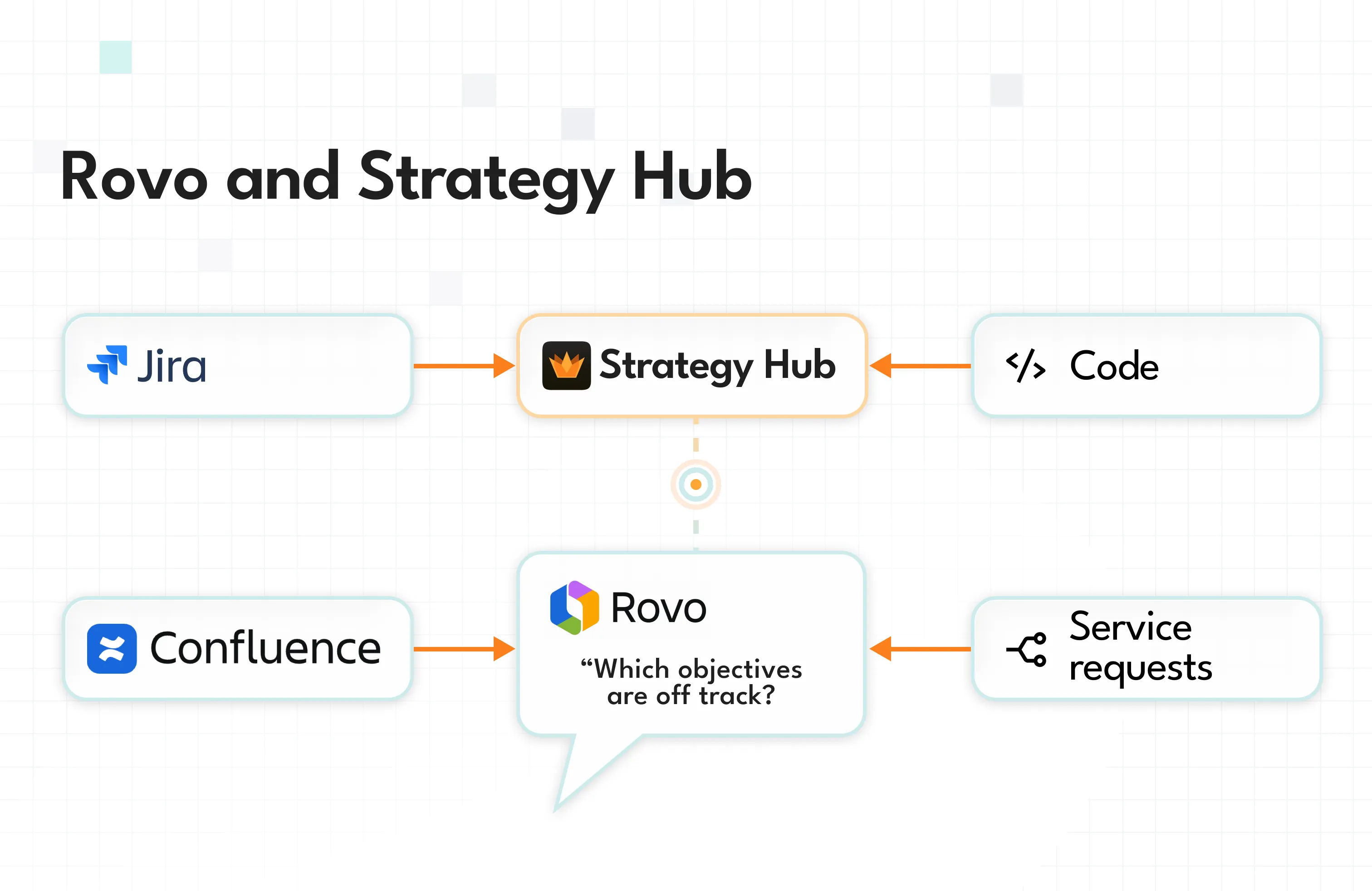
Atlassian describes its Teamwork Collection as built on a shared context layer called the Teamwork Graph. In plain terms, it is a map of how your work fits together: which work items, pages, code, conversations and people relate to each other. It already reaches across:
- Planning and execution: Jira, and Jira Product Discovery for product ideas.
- Knowledge: Confluence, the place where changing information lives for everyone who works with knowledge, plus Loom recordings (gosh, I love Loom!).
- Code: Bitbucket, plus connectors for GitHub and others and a GitLab connector.
- Signals from your users: Jira Service Management, where requests and feedback arrive.
- Goals, teams, people and assets: Atlassian’s Teamwork Graph CLI lists Jira, Confluence, Bitbucket, Goals, Jira Service Management, Assets, people and teams among the things it can work with.
- Work done by AI agents: in the new Artifacts app, AI-created docs and drafts become shared context that feeds back into the graph.
- Everything else: connectors for tools such as Microsoft Teams and Google Drive, and, since Forge connectors became generally available, custom connectors that any developer or partner can build, with permissions intact.
Atlassian also packages its products into collections, such as Teamwork (Jira, Confluence, Loom and Rovo, together with Goals and Teams), Strategy (Focus, Talent, Align) and Service (Jira Service Management, Customer Service Management, Assets), all listed on its products page.
For someone who builds apps, the takeaway is simple: Atlassian is going to be at the center of everything. If your work lives in Jira, the context around it lives in the same graph.
Why context is king in the AI era#
Anyone who works with AI assistants knows the pattern. The more detailed your specification and your prompt, the better the result, and the less painful the process. A model knows a lot about the world and nothing about your company. Whoever holds the context makes the AI useful.
Atlassian says its own benchmarks show that grounding AI answers in Teamwork Graph data gave 44% more accurate results while using 48% fewer tokens. That is a vendor benchmark, so treat it as one, but it points in the direction anyone who writes prompts already feels.
Strategy is where this gets interesting. The graph can tell an agent which Jira issues are open and who is working on them. It is far more useful if the agent also knows why: which Objective that work serves, and whether that Objective is on track. That is the layer I want Strategy Hub to provide.
Rovo is at the center, and I don’t know who will win#
Rovo is the AI agent at the center of the Atlassian ecosystem. Will it become as popular as the assistants people use today, such as Claude Code, Cursor, Gemini or ChatGPT? I don’t know, and nobody does yet. What I do know is that Rovo is the core of the ecosystem Atlassian keeps building. I also know the graph isn’t locked inside it: Atlassian exposes Teamwork Graph tools through the Rovo MCP server, so other MCP-compatible assistants can use the same context. Betting on the graph is not betting against any assistant.
That is why Strategy Hub is on the Marketplace, and why I never had a single doubt about building a Rovo integration.
What Rovo offers Marketplace apps today, honestly#
I’m not fully happy with what Rovo currently offers Marketplace apps when it comes to team connection and Teamwork Graph integration. But it is moving fast, and I’m optimistic:
- Connectors. Atlassian staff said in the developer community that Teamwork Graph connectors are encouraged for Marketplace apps.
- Reading from the graph. In October, the Teamwork Graph API moved into Preview. It lets a Forge app query connected context across Jira work items, Confluence content, Loom, external development artifacts, Goals and Teams.
- Reading from the frontend. In November, requestTeamworkGraph() also reached Preview. Requests run as the current user and respect their permissions.
This is exactly what I’m looking forward to testing: bringing graph context into our agent, and contributing Strategy Hub Items to the graph. I’ll write about what we learn.
What the Strategy Hub agent does today#
The agent is called Strategy Hub (Jira), and it lives in the Rovo chat panel inside Jira. Rovo is included in Atlassian’s Standard, Premium and Enterprise cloud plans. It does three jobs.
1. It explains the app#
If you want to understand how Strategy Hub works, it is a good place to ask. How do Types and Statuses fit together? How does a rollup get calculated? How do I set something up? You get an answer without leaving Jira or opening the documentation.
2. It helps you create goals and get started#
Describe what you want to achieve in plain words and the agent helps you turn it into goals, Objectives and Key Results, and the work items that belong with them. It is also the fastest way to test the app: a few sentences, and you have a structure to look at instead of an empty workspace.
3. It monitors progress (the most important one)#
Ask about your own work, your team’s work, or any goals and Items you care about. The agent reads from the same Strategic Items, Statuses, progress and Insights you see in the views. Questions can be as simple as:
- “Which of my Key Results are off track this quarter?”
- “Summarize how the Increase Revenue Objective is tracking.”
- “What changed on this Item recently?”
- “Draft a status update for my Team’s work this week.”
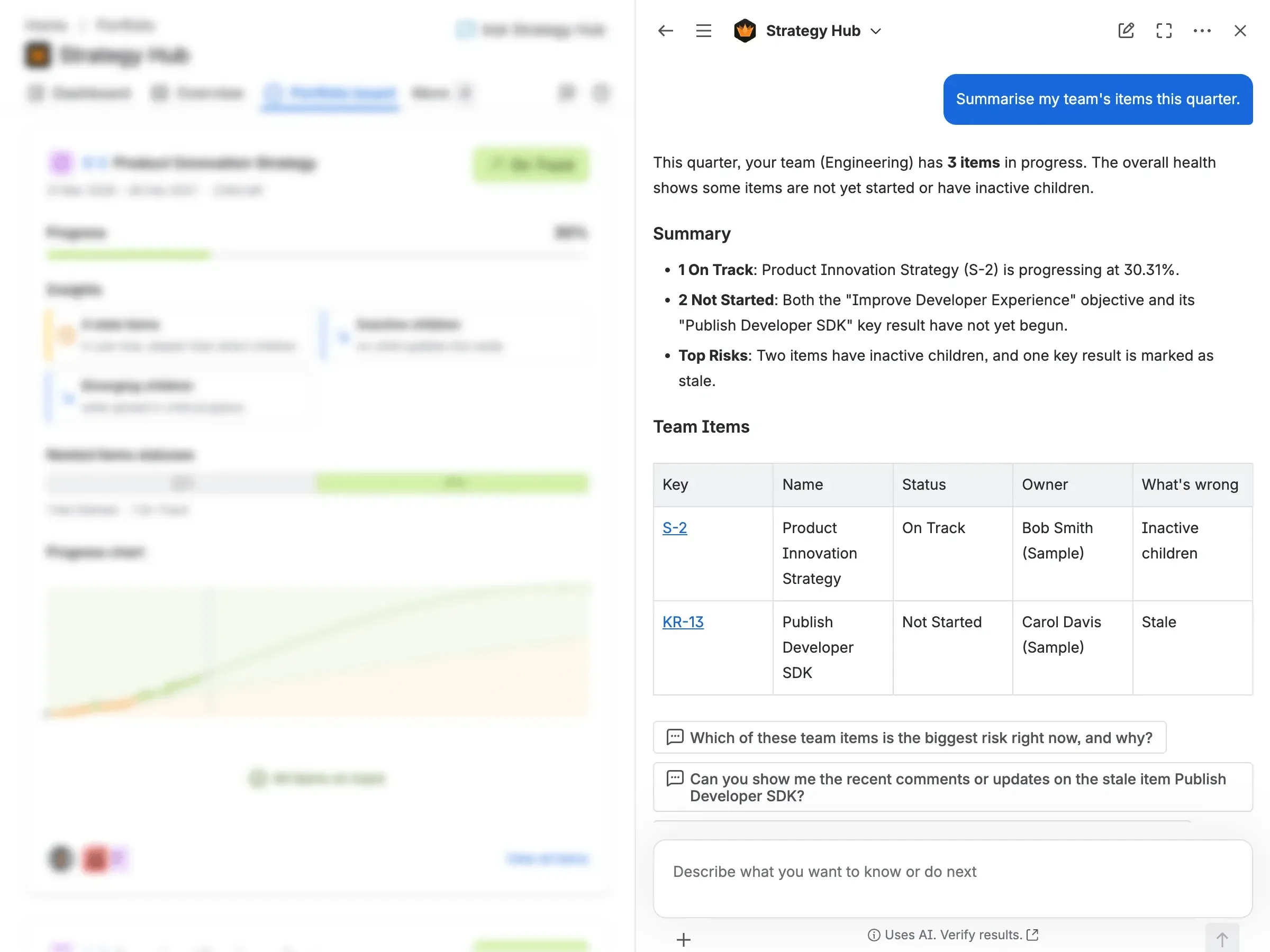
A reply is usually a short summary plus a table, and every row links straight to the Item. After the answer, the agent suggests follow-up questions so you can drill in without retyping.
You can start from several places, as described in the Rovo AI assistant docs:
- the Ask Strategy Hub button in the Strategy Hub header, or on a card such as Needs Attention
- Ask Rovo in Jira’s top navigation, then switch agents, or @mention Strategy Hub in any Rovo chat
- Ask Strategy Hub about this item, from inside an Item
The agent works within your access. It reads only the Items you are allowed to see, so asking through Rovo never widens that boundary. One practical tip: Rovo is conversational, so confirm anything you are going to act on. For a figure of record, open the Item and read it directly.
Who asks what#
The same agent serves everyone, but each role asks a different question:
- Leadership: “Which Objectives are off track this quarter?”
- Managers: “What needs attention under this Objective?”
- Team leads: “Draft a status update for my Team’s work this week.”
- Contributors: “Which Objective does this Key Result belong to?”
Where this goes next#
I believe the Teamwork Graph will be the place where all the context lives, and that Rovo will be at the center of how people use it. I don’t know how fast the Marketplace side will catch up, but I want Strategy Hub to be ready: the goals and strategy layer, connected to the work that already lives in Jira.
I have an ask: if you try the agent, tell me how we can improve it using this link. That is the fastest way for it to get better. You can install Strategy Hub from the Atlassian Marketplace and ask it your first question in a couple of minutes.