
OKR Progress Tracking: The Complete Guide
Every app creator and every blogger writes posts saying “this topic is super crucial, this is super serious”. I have done it myself, including in the post about OKR champions. If you rolled your eyes, fair enough.
So let me say it plainly, and then back it up: progress tracking is one of the most important topics to get right in OKRs. Not because I build software for it, but because the people who invented and popularised OKRs built progress tracking into the definition itself, and most of what goes wrong in real OKR programs goes wrong exactly there. This post covers what progress means, what the experts recommend, and then how we handle it in Strategy Hub. It continues the series that started with why starting is both hard and easy, OKR vs KPI, how each role sees the same strategy and the OKR champion.
Progress tracking is part of the definition of an OKR#
Andy Grove, who created the method at Intel, framed it as two questions, as Google’s re:Work guide recounts: where do I want to go, which gives you the Objective, and how will I pace myself to see if I’m getting there, which gives you the Key Results. The second question is progress tracking. A Key Result is, by design, something you can measure along the way.
That is why Google asks that Key Results be easy to grade with a number. It scores each Key Result from 0.0 to 1.0, then takes a rough average to grade the Objective, noting that some weighting of Key Results is sometimes applied. Some Key Results are binary (the campaign launched or it didn’t), others are granular: launch six features, ship three, and the Key Result scores 0.5. The guide is candid that this isn’t a science, and that being honest and consistent in grading matters more than the exact method.
In Strategy Hub: rollups can be weighted equally, manually, by story points or by priority. See Rolling up from children.
The grade also depends on what kind of Key Result it is. The commonly cited distinction is between aspirational Key Results, where 0.7 is the normal target and the aim is to move as far as possible, and committed Key Results, where 1.0 is expected because the outcome is a delivery or a done/not-done state. Google puts the “sweet spot” for an OKR grade at 60 to 70 percent, and says that consistently hitting everything means the goals weren’t ambitious enough.
What people mean by “progress”#
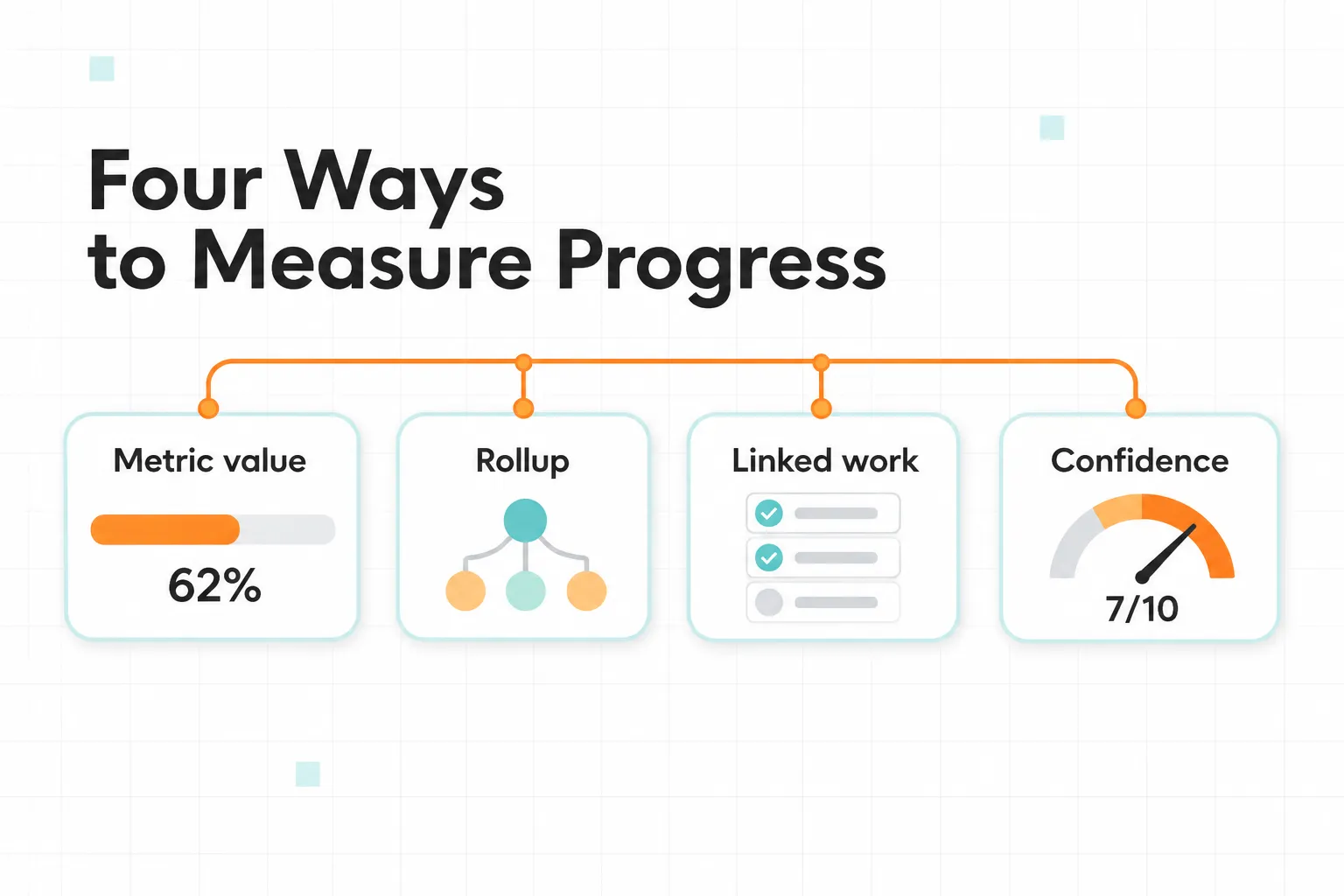
In practice, teams use the word for four different things, and mixing them up is the source of most confusion:
| Method | What it measures | Works well for | Watch out for | In Strategy Hub |
|---|---|---|---|---|
| Metric value | A number moving from a start value to a target | Outcome Key Results, KPIs | Someone has to update it | Manual value mode: the Owner sets the value between a start and a target |
| Rollup from children | The weighted progress of the Key Results or Objectives below | Objectives and any parent Item | An average can hide children moving in opposite directions | Nested items mode, weighted equally, manually, by story points or by priority |
| Linked delivery work | The share of linked Jira issues that are done | Committed Key Results: a launch, a migration, a release | It measures output, not whether anything improved | Linked work items mode: progress derived from the Jira issues you link, picked one by one or by a JQL rule |
| Confidence or status | A judgement on whether the goal will land | Every Item, as a second signal | Subjective, so it needs a regular conversation | Status, manual or automatic and graded against pace, with an Insight when the two disagree |
Each of these methods maps to a setting in Strategy Hub, and you choose which ones are allowed for each Type of Item. The next sections cover each in detail.
Most of the debate in the OKR community is about the third row.
Outcome progress vs. project progress#
If you have ever tracked a Key Result by counting completed tickets, you were measuring row three. OKR coach Felipe Castro is direct about the problem: project metrics measure how many things were done, not whether anything changed. His argument is that an OKR should measure the outcome. Google’s guide gives a practical test: if a Key Result contains words like “consult”, “help”, “analyze” or “participate”, it describes an activity, and the fix is to describe the impact of the activity instead.
Castro adds that this clashes with how agile teams work. When milestone-style Key Results meet agile delivery, the result is friction, because the team already has a roadmap and the Key Results duplicate it.
So is it wrong to track a Key Result by its linked issues? Not always, and the same sources explain why. Castro himself notes that some work is better managed with due dates, and that you sometimes need a preparation project before an outcome can be measured at all. A committed Key Result such as “launch X by the end of the quarter” is genuinely done or not done. The rule of thumb that falls out of this:
- Outcome Key Results (reduce churn from 6% to 4%) should track the metric.
- Delivery Key Results (ship the new billing flow) can track the linked work.
- Parent Objectives should roll up from their children, which is also how Google grades them.
- The mistake isn’t picking one of these. It is using the third to pretend you measured the first.
In Strategy Hub: each Type decides whether its Items track a metric, roll up from children, or follow linked Jira work, so a purist and a delivery team can both work the way they prefer. See Configure types and status sets.
Progress is not the same as health#
A number tells you how far something has moved. It doesn’t tell you whether it will land. That is why the experts recommend tracking a second signal next to progress.
Christina Wodtke, author of Radical Focus, recommends setting a confidence level on each Key Result: when you set it you should be roughly 50/50 about hitting it, and in the weekly status you report whether that confidence moved up or down and why. In her weekly status format, confidence turns red when it falls below 3 out of 10 and green once it passes 7. She adds that OKRs most often fail when they are set at the start of the quarter and then forgotten until the end, and that a confidence of 10 out of 10 is sandbagging.
Practitioner Peter Kappus goes further: he argues it is more informative to report confidence than progress, because reporting progress should be “boringly easy”, and if it isn’t, your Key Results probably aren’t measurable enough. That is a useful test for any tracking setup. If collecting the number takes effort, the number is the problem, not the people.
There is a time dimension too. A raw percentage means little without the calendar next to it. 40% on day 10 of a quarter is strong, and 40% on day 75 is a problem. Google’s guide recommends a midpoint check-in for all levels of OKRs for exactly this reason.
In Strategy Hub: Status sits next to the value, is graded against pace, and raises an Insight when a manual Status contradicts the numbers. See Auto-status and pace.
How often to update#
The guidance varies, and the honest answer is “it depends”:
- Weekly. Wodtke recommends baking OKRs into the weekly team meeting and weekly status, adjusting confidence every week. Kappus says teams often run the OKR check-in in about 15 minutes and replace other status meetings with it.
- A few times a quarter. Google’s guide says some teams revisit OKRs a few times per quarter, and others find a midpoint check-in enough. The right frequency depends on the team’s seasonality, how well it communicates, and how well it predicts its own outcomes.
Whatever you choose, the principle is the same: a goal nobody has touched for weeks isn’t “on track”. It is unknown.
In Strategy Hub: the update cadence is set per Type, and only a manual update resets the stale clock. See Staleness.
The common tracking mistakes#

- Set and forget. Goals written in week one and revisited at quarter’s end.
- Tracking work instead of outcomes. Counting tasks and calling it progress.
- Reporting progress with no health signal. A bar moving up says nothing about whether the goal will land.
- Inconsistent grading. If teams grade differently, scores can’t be compared.
- Using OKR grades as performance reviews. Google is explicit that OKRs are not synonymous with performance evaluation. Mixing them invites sandbagging and padded numbers.
How Strategy Hub handles progress tracking#
Everything below is documented on the Statuses and progress page. Each part maps to one of the four methods in the table above.
Value and status are kept separate#
Every Strategic Item carries both, which is the same separation the experts above recommend:
- Value answers “how far has it moved?” It is measured against the Item’s start and target values.
- Status answers “how is this going?” It is the named state on the Item’s pill, such as On Track or At Risk.
Three ways to update an Item’s value#
- Manual. The Owner types the value in, and the record keeps who set it and when. This is the metric-value method.
- From nested items. A parent shows the weighted progress of its branch. This is the rollup method.
- From linked Jira work items. The value is computed from the linked issues, for example the share that are Done, and recomputes whenever a linked issue changes. This is the delivery-work method.
Each Type controls which of these modes its Items may use and which one is the default. So you can decide, for example, that Key Results track a metric by default, delivery-oriented Key Results may use linked work, and Objectives roll up from their children. Work gets linked through the Jira integration either by picking specific issues or by saving a JQL rule, so every issue it matches links automatically.
Rollup weights#
When a parent rolls up from its children, each child’s share can be set four ways:
- Equal weight. Every child counts the same.
- Manual weight. You set a weight for each child.
- Story points. A child’s weight is the sum of the story points of its linked Jira issues.
- Priority. A child’s weight comes from the priority of its linked issues, and the priority weights are configurable.
The last two read from Jira, so a large epic can move the needle more than a small one.
Status: automatic, manual, or both#
- Automatic. Strategy Hub recomputes the Status every time progress changes, using the Status Set’s workflow, which maps progress ranges to Statuses (for instance 0 to 25% At Risk, 25 to 70% Off Track, 70 to 100% On Track).
- Graded against pace. The workflow compares the value with expected progress, not only the raw number. An Item is expected to be roughly halfway to target halfway through its planning window, so one tracking below that reads as behind pace even while its value is rising.
- Manual. The Owner picks the Status. Auto-status still computes a suggestion in the background without enforcing it.
- Mismatch flag. When the manual Status and the suggestion disagree, a Status mismatch Insight flags it so one of the two can be corrected.
Update cadence and staleness#
- Set per Type. Each Type defines how long an Item may go without a manual update before it counts as stale and raises a Stalled Insight.
- Only a human resets it. Rollups and values recomputed from linked work keep flowing, but they don’t reset the clock, because only a manual update means a person confirmed the number. An Item whose value moves only automatically can still go stale, and that is deliberate.
- Where you get asked. The Dashboard has a “Needs my response” card that collects at-mentions, Items assigned to you, and Items due an update from you. To be upfront about the current state: this is the in-app Dashboard, not yet email, Slack or push.
Insights: the problems find you#
Strategy Hub watches every Item and raises Insights. You don’t create them.
- What it spots. At risk, behind pace, past or approaching deadline, stalled, status mismatch, inactive children, and unassigned.
- How urgent. Each Insight carries a severity: high, medium or low.
- Where you see them. A Needs Attention list on the Dashboard, pills on the Portfolio board, and count chips on the Team board.
- Looking ahead. A Forecast card projects each Type’s progress to the end of the period along its current trajectory, so a miss shows up before it happens.
Ask instead of looking#
The Rovo agent answers from the same Items, Statuses and Insights, within what you are allowed to see. For example:
- “Which of my Key Results are off track this quarter?”
- “Summarize how the Increase Revenue Objective is tracking.”
- “Draft a status update for my team’s work this week.”
By the book, or your own way#
I’ve tried to make the by-the-book path the easy one. Key Results with a start and target value, parents that roll up from children, a status graded against pace and not just a number, and a clock that notices when nobody has confirmed a number: all of that follows the guidance above.
But companies adapt methods to how they actually work, and the docs-versus-reality gap is real. Some teams run delivery-heavy Key Results and want linked Jira work to drive progress. Others follow Castro strictly and want only metric-based Key Results. Strategy Hub doesn’t force a philosophy. Because progress modes, status modes, weighting, Status Sets and cadence are all configured per Type, a purist can allow only manual metric updates on Key Result Types, and a delivery team can allow linked work and weight by story points. Insights then keep either approach honest: a delivery-driven Key Result that is quietly stale, or one whose manual Status contradicts its numbers, still gets flagged.
If you want to see how it behaves with your own structure, you can try Strategy Hub on the Atlassian Marketplace, and tell me where tracking still gets in your way.